
CampDoc: Best Guide to Camp Registration, Health Forms & Parent Login
Learn how this online platform helps families complete camp paperwork while giving organizers practical tools for registration, medical information, and daily operations.

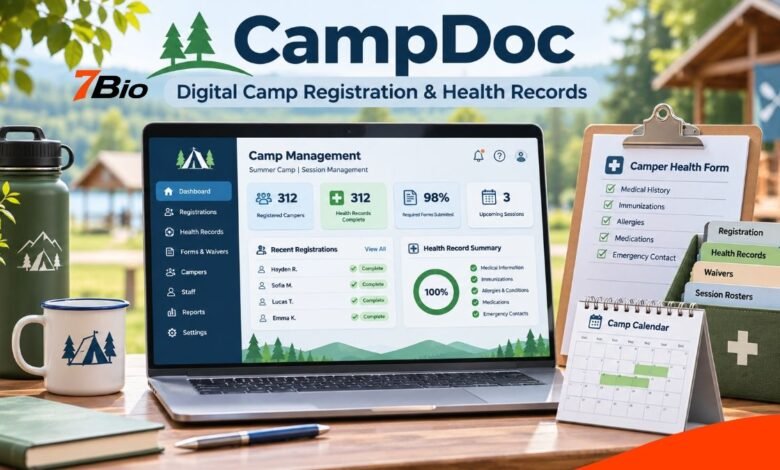
CampDoc is an online registration, electronic health record, and management platform for summer camps and youth programs. It helps organizations collect participant information, manage enrolments, organize health documents, and coordinate key activities without relying entirely on paper forms.
For parents and guardians, the platform provides a convenient way to complete required paperwork, submit medical information and review details before a child attends camp. For administrators and authorized health staff, it brings relevant records into a central system built around youth program operations.
Although the software offers several administrative capabilities, the tools available to each family depend on how the particular camp or organization uses the platform.
This article explains CampDoc’s main features, registration process, parent login, health records, security measures, pricing, and practical steps to avoid common difficulties.
What Is CampDoc?
CampDoc is a cloud-based software platform that combines camp registration, electronic health records, and administrative management tools.
Its primary purpose is to help youth organizations organize the information they need before and during programs. Instead of requiring families to complete multiple paper documents, participating organizations can collect information electronically.
Depending on the organization’s setup, families may use the system to register participants, provide emergency contacts, complete consent forms, upload medical documents, and review previously submitted information.
The platform is especially relevant to programs where organizers must coordinate enrolment information with health and safety requirements.
CampDoc is part of the DocNetwork family of software products, which includes tools for youth programs and educational organizations.
How Does CampDoc Work?
The system connects several administrative tasks through a shared online platform.
A participating organization configures its registration process, participant forms, and operational requirements. Parents or guardians then receive access to the relevant registration or health-information workflow.
After signing in, an authorized user can complete the information the organization requests. Staff members with appropriate permissions can review records and identify outstanding requirements.
This arrangement can reduce the need to transfer information manually between paper forms, registration spreadsheets and health-record folders.
However, completing an online form does not automatically mean a participant has met every admission requirement. Individual programs may have additional policies, deadlines or approval procedures.
Main Features of CampDoc
Online Registration and Payments
One of the platform’s central functions is online registration.
Organizations using the registration tools can configure sessions, collect participant details, and manage enrolment information.
Available administrative capabilities include payment processing, payment plans, discounts, waitlists and registration reporting.
For families, the precise registration experience depends on the program. Some organizations use the full registration system, while others complete enrolment elsewhere and use CampDoc mainly to collect forms and health information.
This difference matters because parents should follow the instructions for their specific camp rather than assume every program uses the same process.
Electronic Health Records
Digital health profiles are another major part of the platform.
Organizations can request information such as medical history, allergies, immunizations, emergency contacts, and other details relevant to participant care.
Parents may also need to upload supporting documents, including health forms or medication authorizations.
These records can help appropriately authorized camp staff access information relevant to their responsibilities.
Nevertheless, an electronic record is only as useful as the information entered. Families should check that the details they provide are accurate, complete and current.
Medication Administration Records
CampDoc includes an electronic Medication Administration Record system, commonly called eMAR.
This tool is designed to help authorized personnel document medication administration, review schedules, and track relevant medication activity.
For programs managing participants who require regular medication, organized records can support staff coordination.
The system also offers alerts and documentation capabilities, but software cannot replace professional clinical judgment, medication verification, appropriate staff training, or the organization’s own healthcare procedures.
Incident and Illness Documentation
Camp staff may need to record illnesses, injuries, or other health-related incidents during a program.
The platform provides tools to document these events and maintain records for authorized personnel.
Depending on the organization’s configuration, administrators can use reporting functions to review recorded incidents and identify matters that require attention.
Accurate documentation supports communication and follow-up, although it does not prevent accidents or guarantee particular health outcomes.
Attendance and Program Management
Beyond medical administration, the software offers operational tools for managing participants.
These include attendance tracking, rosters, enrolment information, reporting and family communications.
Organizers can use these capabilities to keep participant records connected to program activities.
For a camp managing multiple sessions or locations, having information in one system may be more practical than maintaining unrelated records across several services.
How to Create a CampDoc Account and Log In
Parents usually access the platform after receiving instructions from the camp or youth organization.
The exact process depends on whether the organization sends an invitation or provides a registration link.
- Check your registration email. Look for an invitation or instructions from the organization via CampDoc.
- Use the correct email address. The account should normally be linked to the email address you provided during enrolment.
- Accept the invitation if required. New users may need to confirm their email address and create a password.
- Sign in to the account. Returning users can generally access their existing profile with their previously established credentials.
- Select the participant. Open the relevant participant profile or registration section.
- Complete the required information. Review forms, submit details, upload requested documents, and check for incomplete sections.
The official parent login is available through app.campdoc.com.
Families should access the platform through an official address or a link supplied by their organization. They should avoid entering account credentials into unfamiliar websites.
Completing a CampDoc Health Profile
A health profile contains questions and forms selected by the participating organization.
Its name may vary. Some programs use terms such as Participant Profile, Student Profile, or Camper Profile.
After logging in, parents can select the participant and open the appropriate profile.
Required information may be highlighted within the form, making it easier to identify missing answers.
Certain sections may ask for emergency contacts, medical information, authorizations, or supporting documents.
Before marking the work as complete, parents should review every section and check whether the organization requires any additional actions.
Prepare Documents Before Starting
Having documents ready makes the process easier.
Depending on the camp’s requirements, useful information may include:
| Information | Why it may be needed |
|---|---|
| Emergency contacts | To identify people the organisation can contact |
| Allergy information | To inform relevant health and safety procedures |
| Medication details | To support authorised medication management |
| Immunisation records | To satisfy programme-specific requirements |
| Consent forms | To document required permissions |
| Authorised collection contacts | To identify adults permitted to collect a participant |
Not every camp requests every item. Families should follow the actual requirements displayed by their organization.
Can Parents Update Information After Registration?
Parents can generally return to their accounts to review information and, where permitted, make updates.
However, some organizations establish deadlines or lock dates after which particular forms can no longer be edited directly.
These restrictions may exist because staff need time to review records before a program begins.
If a participant’s medication, allergy information, or other important health details change after the editing deadline, the parent should contact the program promptly.
Families should never assume that previously submitted information remains appropriate for a new program or another year.
Returning participants may also need to complete newly introduced questions or sign updated forms.
CampDoc Security and Data Privacy
Health information is sensitive, particularly when it concerns children.
The provider states that its platform includes role-based permissions, controls for access to protected health information, and security measures intended to support organizational compliance.
CampDoc also describes its service as supporting HIPAA and FERPA compliance and SOC 2 Type II requirements.
These are relevant considerations for organizations evaluating software that stores participant information.
Nevertheless, compliance-related claims should not be interpreted as a guarantee that every organization using the system automatically meets all its legal responsibilities.
Participant information protection also depends on account management, appropriate permissions, organizational policies, and staff practices.
Parents can reduce avoidable risks by using strong passwords, keeping their login details private and signing out of shared devices.
Camp administrators should review access permissions carefully and ensure staff can view only the information appropriate to their roles.
CampDoc Pricing and Subscription Costs
According to the provider’s published pricing information available in November 2026, organizational plans start at US$355 per month.
The provider states that pricing is tailored to program requirements and includes onboarding, training, and support.
This starting figure relates to organizational software pricing. It should not be confused with the fees families pay to attend a camp.
Individual camps set their own program charges, payment arrangements, and any applicable registration fees.
Organizations considering the service should request a current quotation and confirm which features, integrations, and contractual conditions apply.
Software pricing can change, so check published figures again before making a purchase decision.
Benefits and Limitations of CampDoc
The platform’s potential benefits are closely connected to organization and accessibility.
Families can complete required information without repeatedly exchanging paper forms. Program administrators can bring together registration information, health records, and operational data.
Authorized staff may also identify missing documents earlier and prepare more efficiently for a new session.
Yet there are practical limitations.
The system still depends on accurate data entry, reliable internet access, appropriate staff training and careful administrative oversight.
Families with limited digital access may require additional assistance, and some participants may have documentation needs that cannot be resolved through an online form alone.
Organizations also need to consider subscription costs, existing software integrations, and internal workflows.
A camp with simple requirements may evaluate the platform differently from a large organization managing multiple locations and complex health records.
Common CampDoc Login and Registration Problems
Most access issues can be resolved with a few straightforward checks.
Invitation email not received: Check spam and junk folders, confirm which email address was provided to the camp, and contact the organization if necessary. The official help center also explains how eligible users can request a new invitation.
Forgotten password: Use the password-reset option on the official login page and follow the instructions sent to the registered email address.
Participant missing from the account: Ask the organization to confirm the participant’s registration details and whether the profile has the correct email address.
Form not available for editing: Check whether the organization has established a submission or lock deadline. If information must be updated, contact the program administrator.
Document upload difficulties: Check the accepted file format, file requirements, and browser compatibility. If the problem continues, use the platform’s technical support.
The provider’s official support contact is support@campdoc.com. Support staff can help with technical access issues, while program-specific policies and enrolment decisions normally remain the camp’s responsibility.
Is CampDoc Suitable for Every Youth Program?
CampDoc is designed for organizations that need coordinated registration, participant health records, and operational management.
It may be particularly relevant to overnight camps, day camps, recreation programs, youth organizations and educational activities that collect detailed participant information.
The best fit depends on the organization’s requirements.
Before choosing a platform, program administrators should evaluate its registration workflows, health-record needs, access controls, reporting capabilities, available integrations, accessibility, and total cost.
They should also consider how they will review and maintain information throughout the season.
A useful software system should support well-defined operational procedures, not replace them.
Final Thoughts
CampDoc provides a connected approach to managing camp registration, electronic health records and everyday youth program administration.
Its main value is helping participating organizations organize information that would otherwise be handled through multiple forms and separate processes.
For families, completing health profiles carefully, submitting documents on time, and keeping information up to date remain essential.
For administrators, the platform’s usefulness depends on appropriate configuration, staff training, data protection practices and reliable operating procedures.
Understanding these responsibilities can help both families and organizers use the system more effectively.
FAQs
1. What is CampDoc mainly used for?
CampDoc is used by participating camps and youth programs to manage online registration, participant health information, medical documentation, and administrative activities. Available features depend on each organization’s setup.
2. Can I use my existing CampDoc account for another camp?
An existing account can generally be reused when another participating organization associates your registered email address with its program. You may still need to complete new forms and permissions.
3. Can parents use CampDoc on a mobile phone?
The provider describes its platform as mobile-friendly. Parents can access supported functions through a compatible browser, although particular document uploads and forms may have their own requirements.
4. What happens if a medical detail changes after the forms are locked?
Contact the camp or program administrator promptly. The organization can explain its procedure for reviewing changes after the editing deadline, especially where medication or allergy information is involved.
5. Does CampDoc replace medical professionals or guarantee camper safety?
No. CampDoc provides information-management and documentation tools. Qualified personnel, trained staff, appropriate healthcare procedures, and the organization’s safety policies remain necessary for participant care.